How to Win Back Lost Customers: A Step-by-Step Reactivation Playbook
In This Document
Never keep a lead waiting. Try AI ChatIQ.
To win back lost customers, identify why they stopped returning, send a relevant message, and make the next booking easy. A useful reactivation plan combines a friendly check-in, a reason to reconsider, carefully timed follow-ups, and a website that helps returning customers take the next step.
Think about the salon client who used to visit every six weeks and has now been absent for four months. There may be no dramatic reason behind the gap, but without a customer reactivation strategy, that familiar name can stay missing from your calendar indefinitely.
This playbook covers the reasons customers leave, a five-message sequence, channel choices, automation, and templates you can adapt. It also explains where Bookzzy’s RetainIQ fits: helping you capture renewed interest when someone returns to your website and is about to leave again.
Why Customers Stop Coming Back, and What to Do About It
Before writing a return offer, check the customer’s booking history, previous conversations, and any unresolved concerns. These details help you choose a message that addresses the situation instead of sending every inactive customer the same promotion.
1. Their routine changed and the habit faded
A busy month, a new work schedule, or a missed appointment can interrupt a regular routine. When there is no sign of dissatisfaction, start with a warm invitation and a direct booking link that makes returning easy to arrange.
2. A competitor made something more convenient
Another business may offer later appointments, a closer location, or a service that better fits the customer’s schedule. Consider which of your own advantages could matter to them before assuming a lower price will solve the problem.
3. One disappointing experience remained unresolved
A rushed service, a booking mistake, or an unanswered complaint deserves a personal response. Review what happened, acknowledge the issue, and explain what you can do to make the next experience better before inviting another purchase.
4. Their needs or circumstances changed
A customer who moved, changed their budget, or no longer needs the service may have little reason to return. Ask what would be useful now, and give them room to say that their situation has changed.
5. Booking became more effort than expected
Try rebooking from your phone as though you were a customer with two minutes to spare. Unclear prices, missing availability, repeated questions, and slow replies are problems to resolve before you send people back to the website.
Be the First to Respond, Every Time
Bookzzy AI ChatIQ answers questions and qualifies leads instantly, so no enquiry goes cold while your team is busy
How to win back customers from competitors
Give customers a specific reason to reconsider your business, such as extended hours, continuity with a familiar specialist, or a service improvement they have not experienced.
For example, a salon with new evening appointments could invite a former regular to return at a more convenient time. A complimentary consultation may suit someone considering a different service, provided it is something your business can actually offer.
Use this table to choose the starting point for your customer win back strategy:
| Why they left | A useful win-back angle |
|---|---|
| Their routine faded | A friendly reminder and an easy booking link |
| A competitor suited them better | A relevant difference and a reason to reconsider |
| They had a poor experience | A personal apology and a practical resolution |
| Their needs changed | A question about what would help now |
| Booking was difficult | A simpler booking journey they can try |
Give returning visitors a useful next step. Explore RetainIQ and plan an offer or inquiry prompt for the page your win-back message sends them to.
Step-by-Step: A Five-Message Win-Back Sequence
To win back lost customers with a repeatable sequence, define when someone becomes inactive before deciding when to send the first message.
As a starting point to test, use 1.5 to 2 times their usual visit interval. A client who normally returns every six weeks might enter your inactive segment after nine to twelve weeks, while a seasonal customer needs a different threshold.
Day 1 below begins when the customer crosses that threshold, not immediately after their last visit.
Adjust the cadence to your service cycle and the customer’s response; five messages are a planning example, not a requirement for every contact.
Message 1: Day 1, reopen the conversation
Use email or a permitted SMS to make a friendly check-in, with a familiar service reference where appropriate. Keep the invitation easy to act on, without implying that the customer owes you an explanation for being away.
Example: “Hi [Name], we’d love to welcome you back to [Business]. If you’re ready for your next visit, you can find a time here: [Link].”
CTA: Find a time that works for you.
Message 2: Day 7, offer something useful
If the customer has not replied or booked, use email to share a relevant improvement, such as later opening hours or a simpler booking process. Choose one change that could make their next visit easier, and explain it clearly.
Example: “Hi [Name], we now offer [New Availability], which may make your next [Service] easier to fit around your week. You can view the options here: [Link].”
CTA: Explore the new options.
Message 3: Day 14, give them a reason to return
Where appropriate, send a concise SMS with an approved return offer, such as a service upgrade or a consultation. Explain the terms clearly and use an expiration date only when it reflects a real deadline your team will honor.
Example: “Hi [Name], you’re welcome to add [Benefit] to your next [Service] if you book by [Date]. Details and appointments: [Link].”
CTA: View your return offer.
Message 4: Day 30, ask what would help
Use a short email to invite feedback from customers who remain inactive, and make replying as easy as possible. A useful question gives them space to explain whether timing, the service, or something else has changed.
Example: “Hi [Name], is there anything that would make visiting [Business] easier for you? You can reply here, and [Team Member] will read your message.”
CTA: Tell us what would help.
Message 5: Day 60, close the sequence respectfully
Use the customer’s preferred permitted channel for a final invitation, then end this particular sequence if there is no response. If you repeat an offer, keep the terms consistent and make sure it is still available.
Example: “Hi [Name], this is our final check-in about returning to [Business]. If the timing is right, you can explore your options here: [Link].”
CTA: Plan your next visit.
Rules that keep the sequence useful
- Stop promotional win-back messages when someone books or opts out.
- Pause automation when a customer replies and assign the conversation to a person.
- Use permitted contact channels and keep opt-out instructions clear.
- Personalize from verified information, keeping sensitive details out of routine messages.
- Review offers against margin and capacity before sending them.
Give customers a way to ask for help before they leave again. Start Bookzzy’s 14-day free trial and create a RetainIQ popup for your campaign’s landing page.
Win-Back Email vs. SMS vs. Phone Call: Which Works Best?
Email gives you room to explain an improvement or offer, SMS suits a concise prompt, and a phone call allows a personal conversation. Choose according to the customer’s preferences, the message, and your team’s ability to respond, rather than assuming one channel will always perform best.
A practical customer reactivation strategy can combine these channels, provided each contact has a purpose and the customer has agreed to the relevant communication.
| Factor | SMS | Phone call | |
|---|---|---|---|
| Useful for | Service updates, offers, feedback | Brief reminders and direct links | Personal outreach and resolving concerns |
| Message format | More room for context | Short and focused | A two-way conversation |
| Staff involvement | Setup and reply handling | Setup and reply handling | Time for each conversation |
| Automation | Scheduled messages and workflows | Workflows with a supported provider | Call lists and staff follow-up |
| Main consideration | Keep the message relevant and readable | Avoid excessive or intrusive contact | Be prepared and respect the person's time |
When to pick up the phone
A call may be appropriate for a long-standing regular or someone whose last visit ended with a concern. Review the history first so the customer does not have to explain everything again, and begin by asking whether it is a convenient time to talk.
When assessing results, look beyond opens and clicks to completed bookings, attended appointments, and the value of the returning relationship. A channel that generates activity still needs to bring back customers who want your service.
How to Automate Customer Win-Back Campaigns Using AI Tools
To automate a customer win-back campaign, connect reliable customer records to an inactivity trigger, a messaging workflow, and booking updates. AI can assist with drafting and analysis when your chosen tools support it; dependable rules, permissions, and connected systems are what keep the process running correctly.
1. Define and detect inactivity
Use visit history to identify customers who are overdue for their normal service cycle. A rules-based trigger may be sufficient, particularly when you have limited data, and should exclude anyone who already has an upcoming appointment.
2. Segment customers by a useful difference
Group customers by last service, visit frequency, or a documented reason for leaving. Keep unresolved complaints in a separate follow-up process, and avoid treating an algorithm’s guess about someone’s circumstances as a confirmed fact.
3. Draft relevant messages for review
Use AI to help adapt approved copy for different groups, then check the details before activating the workflow. Review names, service references, booking links, and offer terms, and keep private customer information within approved systems.
4. Set the channel, timing, and exit rules
Configure the sequence in your CRM or messaging platform, with sending times appropriate to the customer’s location. Connect booking updates where supported, then test whether bookings, replies, and opt-outs stop or pause the correct messages.
5. Help customers when they return to the website
Send each message to a relevant page with a clear next step. Bookzzy’s AI ChatIQ can answer questions from approved business content, while BookingIQ provides a booking page or embedded booking journey.
Confirm any connection between those interactions and your outbound workflow before relying on automatic status updates.
6. Measure reactivation and recovered value
Define the outcome and measurement window before launch. For a service business, an attended appointment is a stronger reactivation signal than a booking that is later canceled.
Reactivation rate = customers who complete the chosen return action within the measurement window / unique lapsed customers contacted x 100.
For example, if 20 of 200 contacted customers attend within your agreed window, the observed reactivation rate is 10%. This is illustrative, not a benchmark or proof that every return was caused by the campaign.
Where practical, compare against a similar group that received no win-back messages, and track recovered revenue alongside discounts, service delivery costs, and campaign costs.
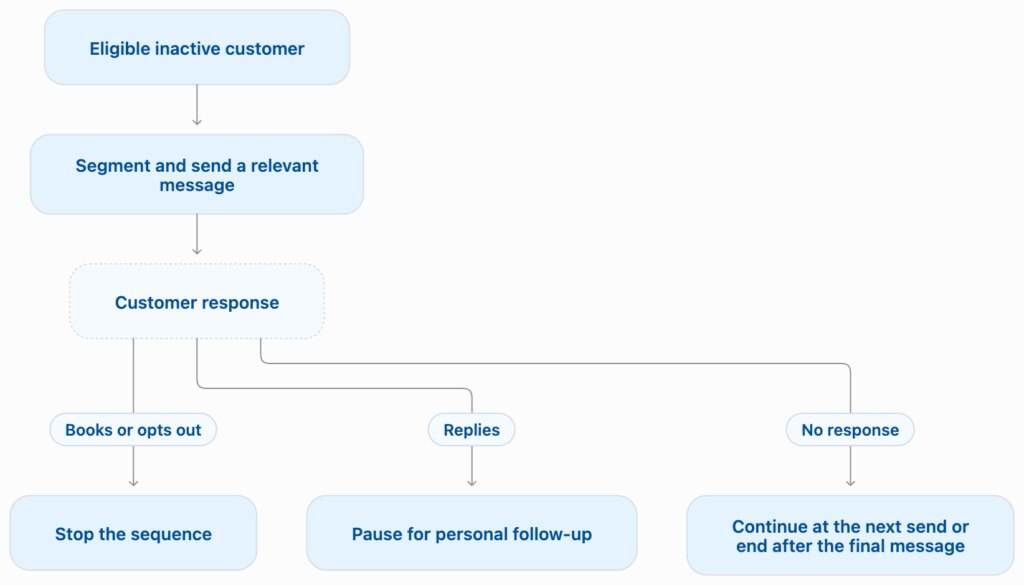
Workflow to configure: Identify eligible inactive customers, assign a segment, send a relevant message, and check the response before continuing. A booking or opt-out ends the sequence; a reply pauses it for a person to handle.
Real Win-Back Message Templates You Can Use Today
Adapt these templates to your business, the customer’s history, and an offer you can deliver. Replace every placeholder, test each link, and include the opt-out wording required for the channel before anything is sent.
Template 1: A friendly check-in
Use this for a customer who appears to have drifted away, with no unresolved complaint.
Hi [Name], we’d love to see you at [Business] again. Ready for your next visit? Choose a time here: [Link]. Reply STOP to opt out.
Keep the final SMS within your provider’s intended message length after inserting the business name and URL, since placeholders can make the finished version longer.
Template 2: A useful reason to reconsider
Use this email when you have a real improvement that could make returning more convenient.
Subject: [Name], a little more flexibility for your next visit
Hi [Name],
Since your last visit, we’ve introduced [Specific Improvement] at [Business], giving you more flexibility when planning your next [Service].
If finding a suitable time was difficult before, you can now [Explain the Practical Benefit]. You can see the available options and choose what works for you using the link below.
We’d be happy to welcome you back whenever the timing feels right. If you have a question before booking, reply to this email and our team will help.
[View Appointment Options]
[Sender Name]
Template 3: A final invitation
Use this when you are ending the sequence and the stated offer remains available.
Subject: [Name], one final note about your return offer
Hi [Name],
Before we close this check-in series, your [Return Benefit] is available until [Date], if you’d like to visit [Business] again.
You can find the details and choose an appointment here: [Link]. If now isn’t the right time, you’re welcome to get in touch whenever you need us.
[Sender Name]
Make the message fit your business
- Salon: “Our new evening appointments may make your next visit easier to fit around work.”
- Gym: “If your routine has changed, we can help you explore a class schedule that suits you.”
- Clinic: “If you would like to arrange an appointment, our team can help you find a suitable time.”
- Spa: “You can explore the treatment options and choose a time for your next visit here.”
Give these messages a clear destination. Try Bookzzy free and build a return journey with a useful next step for visitors who need more time.
How RetainIQ Supports Your Customer Win-Back Strategy
Imagine a former customer opening your email, clicking through, and spending time on your services page. They are interested enough to look, but a question about the service or uncertainty about timing may still stop them from booking.
That moment belongs in your customer win back strategy, because getting someone back to the website is only one part of helping them return.
RetainIQ is Bookzzy’s exit-popup and lead-capture app. You can configure a relevant message by page, device, timing, and frequency, then offer a booking link or a short inquiry form. Captured details can be stored and routed to configured destinations for follow-up.
An example for a returning salon client
Suppose your win-back email sends customers to a dedicated page explaining your current services and a return offer. You configure a RetainIQ popup for that page with a helpful alternative for someone who is about to leave:
Need help choosing your next appointment?
Leave your details and our team will help you find the right service and a suitable time.
Help Me Choose
Keep the form brief and make sure someone is responsible for responding. A submitted inquiry becomes a conversation your team can continue, while customers who are ready can use the booking route already on the page.
Your CRM or messaging tool manages the outbound sequence and its stopping rules; RetainIQ supports the visit that follows the click.
Start with one page and one relevant prompt, then measure qualified inquiries and completed bookings. That gives you a focused test of whether the additional step helps customers move forward.
Create your first RetainIQ popup with Bookzzy’s 14-day free trial. No credit card required.
Questions? Answered.
Can't find what you're looking for? Our team typically responds within 2 hours on weekdays.
How do you win back lost customers?
+Start by checking why they left, then send a relevant message with one clear next step. Follow up at intervals that suit your business, resolve concerns personally, and make booking straightforward. Stop the win-back sequence when the customer returns or opts out.
How do you win back customers from competitors?
+Focus on a relevant advantage, such as more convenient hours, a familiar specialist, or a service improvement. Give the customer a reason to reconsider without criticizing their current provider, and offer an easy way to explore returning before asking for a larger commitment.
How do you automate customer win-back campaigns?
+Set an inactivity threshold, segment eligible customers, and configure messages in a CRM or messaging tool. Connect booking and response updates where supported, and test the stopping rules. AI can help with drafting or analysis, while people handle complaints and conversations that need judgment.
What is a win-back campaign?
+A win-back campaign is a targeted series of messages intended to encourage inactive customers to return. It usually includes a check-in, a useful reason to reconsider, and a clear action such as booking an appointment, with follow-ups adjusted according to the customer's response.
How do you write a win-back email?
+Use a relevant subject line, acknowledge the gap naturally, and explain one reason to return. Keep the message focused on the customer's situation, include one clear CTA, and send them to a page that matches the offer or service described in the email.
How long before a customer is considered inactive?
+Base inactivity on the customer's normal service cycle. As a starting point to test, a six-week visitor might be considered overdue after nine to twelve weeks. Adjust that threshold for seasonal services, occasional purchases, and customers who already have an appointment scheduled.
Is there a free Mindbody alternative?
+Some platforms provide low-cost or free-entry models, although pricing structures and transaction fees can vary. Businesses should compare the total cost of using each platform rather than choosing solely on the advertised entry price.