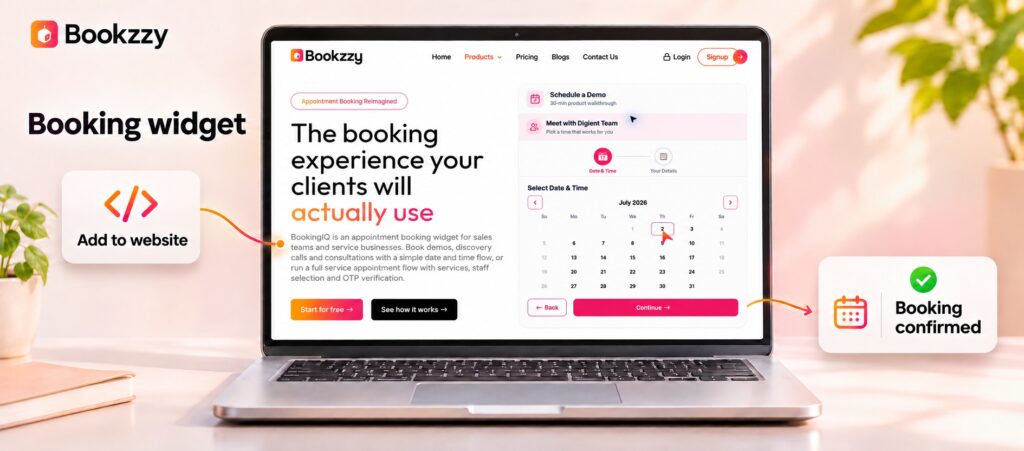
Booking Widget: What It Is, How It Works, and How to Add One to Your Website
In This Document
Never keep a lead waiting. Try AI ChatIQ.
A booking widget lets visitors check your availability and book an appointment directly from your website without calling, emailing, or waiting for someone from your team to respond.
For service businesses, that small change can make a significant difference because people often visit a website when they are already interested in taking the next step. Instead of sending them away to make a phone call or wait for a reply, an online booking widget gives them an immediate way to turn that interest into a confirmed appointment.
With tools such as Bookzzy BookingIQ, you can create a more convenient path from website visit to booking while reducing the amount of manual scheduling your team needs to manage.
Ready to make your website easier to book from?
Start your Bookzzy free trial and create your booking experience with BookingIQ.
What Is a Booking Widget?
A booking widget is an embeddable scheduling tool that allows website visitors to view available appointment times and book directly from a website.
Instead of displaying only a phone number or contact form, the widget gives visitors an immediate action they can take while their interest is still high.
For example, someone searching for a salon may arrive on its service page at 9:30 p.m. The salon might already be closed, but the potential customer is ready to make an appointment. With a booking widget on the page, that visitor can choose an available time and complete the booking without waiting until the following morning.
This is why booking widgets are particularly useful for businesses that depend on appointments, consultations, demonstrations, classes, or scheduled services.
What does a booking widget include?
Depending on the booking system you use, an appointment booking widget may include:
- Service or appointment selection
- Available dates and time slots
- Staff or resource selection
- Customer contact details
- Additional booking questions
- Booking confirmation
- Calendar integration
- Rescheduling options
- Automated confirmation or reminder workflows
The goal is not to make the booking process more complicated. A good booking widget removes unnecessary steps and helps visitors move from interest to appointment with as little friction as possible.
Who can use a booking widget?
Booking widgets can work across almost any appointment-driven business, including healthcare and wellness practices, salons and spas, fitness studios, consultants, coaches, agencies, tutors, training providers, professional services, home service businesses, and sales teams.
Whether your business operates from a single location or serves customers across multiple cities and time zones, the principle remains the same. Visitors should be able to see when you are available and take the next step without unnecessary back-and-forth communication.
Booking Widget vs Booking Page vs Booking Plugin
The terms booking widget, booking page, and booking plugin are often used interchangeably, but they describe slightly different ways of offering online scheduling.
| Feature | Booking Widget | Booking Page | Booking Plugin |
|---|---|---|---|
| Where it lives | Embedded inside your website | Separate booking URL | Installed within a website platform |
| Setup effort | Usually simple | Usually very simple | Depends on the website platform |
| Design control | Can match the surrounding website | Usually follows the booking tool's design | Often highly customizable |
| Keeps visitor on your website | Yes | Usually no | Yes |
| Best for | High-intent website pages | Social, email and direct links | Websites built on supported platforms |
A booking widget for a website is particularly useful when you want visitors to stay within your existing website experience while making an appointment.
A standalone booking page is useful when you need to share a direct booking link through email campaigns, WhatsApp conversations, social media profiles, digital advertisements, or other channels.
Many businesses can benefit from using both approaches. The widget can support high-intent website visitors while the standalone booking link gives customers an easy path to book from external channels.
Be the First to Respond, Every Time
Bookzzy AI ChatIQ answers questions and qualifies leads instantly, so no enquiry goes cold while your team is busy
How Does a Booking Widget Work?
Although the experience looks simple from the customer’s perspective, a booking widget connects several parts of the scheduling process behind the scenes.
Here is how a typical online booking widget works.
1. You set up your services and availability
You begin by defining what customers can book.
This might include a 30-minute consultation, a one-hour appointment, an introductory call, a treatment session, a demonstration, or another type of service.
You also determine when appointments are available so visitors are not shown times that cannot actually be booked.
2. You add the booking experience to your website
Depending on the booking platform and website builder, you may add the booking system through an embed code, a website component, a button, or a dedicated booking page.
The objective is to place the booking option somewhere visitors can easily find it.
3. The visitor chooses an available time
When someone opens the appointment booking widget, they can review the available dates and times and choose an option that works for them.
Displaying actual availability removes the need for messages such as:
“Are you available Tuesday?”
“How about Wednesday morning?”
“Is 3:00 p.m. still free?”
The customer can simply choose from the available options.
4. The visitor enters their details
Once a slot has been selected, the customer provides the information required to complete the booking.
For many businesses, keeping this step simple is important. Asking for a name, email address, phone number, and one or two relevant questions is usually more effective than turning the booking experience into a lengthy enquiry form.
5. The appointment is recorded
After the booking is completed, the selected time is reserved so that your team can manage upcoming appointments more efficiently.
A well-configured scheduling system can also help reduce situations where two customers attempt to book the same availability.
6. The visitor receives confirmation
Customers should know immediately that their appointment has been successfully booked.
Clear booking confirmations create confidence and reduce unnecessary follow-up questions.
7. Your team can continue the customer journey
The booking itself is only one part of the customer experience.
Depending on the tools and workflows your business uses, the information collected during the booking process can help your team prepare for the appointment, follow up afterwards, encourage repeat bookings, or continue the conversation.
This is where connecting booking tools with forms, conversational experiences and retention tools becomes particularly valuable.
| Lead generation tactic | Best suited for | Setup effort | Bookzzy tool |
|---|---|---|---|
| Exit popups | Visitors preparing to leave | Low | RetainIQ |
| AI-powered chat | Visitors with product questions | Medium | AI ChatIQ |
| Smart forms and product finders | Shoppers comparing options | Medium | FormIQ |
| Product interest forms | High-intent shoppers | Low | FormIQ |
Types of Booking Widgets
There is no single booking widget format that works for every website. The right format depends on your website design, the importance of appointments to your conversion funnel, and how visitors normally interact with your pages.
Inline embedded booking calendar
An inline booking calendar appears directly inside a page.
This approach works especially well on service pages, appointment pages and contact pages because visitors can begin booking without opening another window.
If someone has already read about your service and decided they are interested, placing the calendar nearby gives them a logical next step.
Pop-up booking widget
A pop-up booking widget appears after the visitor clicks a button such as Book Now, Schedule a Call or Check Availability.
This keeps the page design cleaner while still giving high-intent visitors immediate access to scheduling.
It can be particularly useful in homepage hero sections where space is limited.
Floating or sticky booking button
A floating booking button stays visible as the visitor moves through the website.
This is useful on longer pages because the visitor does not need to scroll back to the top after deciding they want to book.
The approach can also work well on mobile websites where persistent calls to action make it easier for visitors to continue.
Chat-based booking
Some businesses combine conversational experiences with appointment scheduling.
Instead of asking visitors to leave the conversation and search for the booking page, the website can guide them towards the relevant appointment experience while they are already engaged.
For businesses using the wider Bookzzy platform, this creates opportunities to connect AI chat with BookingIQ and create a smoother journey from question to conversation to appointment.
The Complete Online Booking Experience
The booking widget may be what customers see first, but the quality of the overall booking experience depends on what happens around it.
An effective online booking system should reduce friction for customers while making appointment management easier for the business.
Scheduling and availability
Real-time availability
Visitors should be able to understand which appointment times are currently available instead of submitting a request and waiting for confirmation.
Calendar coordination
Your booking process should work alongside the calendars and scheduling workflows already used by your business wherever supported by your booking setup.
Buffer time
Businesses that need preparation, travel, cleaning, documentation or breaks between appointments should account for that time when configuring availability.
Time zone awareness
If you provide online consultations, demonstrations or coaching across different locations, clearly communicating appointment times becomes especially important.
This can help a consultant in London schedule calls with prospects in New York, or a SaaS business in India arrange product demonstrations with customers in Europe without creating unnecessary confusion.
Staff and service availability
Businesses with several services or team members should make it easy for customers to understand what they are booking and who the appointment is with.
Booking experience
Simple design
Your booking experience should feel like part of your website rather than an unrelated third-party journey.
Mobile-friendly scheduling
A significant proportion of service discovery now happens on mobile devices, which means the booking process should remain easy to complete on a smaller screen.
Relevant customer information
Sometimes you need more than a name and email address before an appointment.
This is where Bookzzy FormIQ can support more detailed lead capture when additional customer information is required.
Conversational assistance
Visitors may have questions before they feel comfortable booking.
Connecting the customer journey with AI ChatIQ can help businesses answer those questions before directing the visitor towards the right booking action.
Reducing missed opportunities
The biggest advantage of online scheduling is not simply convenience. It is the ability to capture demand while the customer is actively considering your business.
Someone comparing three local clinics, consultants, salons or service providers may not remember to return the following day and make a phone call.
If they can book immediately, your website has a much better opportunity to turn that visit into a real customer interaction.
Follow-up and retention
Appointment businesses should also consider what happens after the first booking.
Visitors who have already booked once are often easier to re-engage than completely new prospects.
A broader Bookzzy setup can combine booking experiences with tools such as RetainIQ, helping businesses create more opportunities to bring interested visitors and existing customers back into the conversion journey.
Benefits of Adding a Booking Widget to Your Website
Capture bookings outside business hours
Customers do not restrict their searches to your opening hours.
Someone might search for an orthodontist at 10:30 p.m., look for a personal trainer early in the morning, or research a consultant during the weekend.
An online booking widget gives these visitors something useful to do immediately instead of asking them to remember your business later.
Respond to customer intent immediately
A traditional contact form collects an enquiry.
A booking widget can move the visitor further by allowing them to choose an appointment while they are already interested.
That reduces the time between discovery and action.
Reduce scheduling back-and-forth
Manual scheduling can involve several emails, phone calls or messages before both sides agree on a time.
Allowing customers to choose from defined availability can remove much of that administrative work.
Create a better customer experience
Customers increasingly expect convenience when dealing with businesses online.
Being able to check availability and book without waiting for someone to respond creates a smoother experience from the beginning.
Convert more website traffic into appointments
Your website may already be receiving visitors through Google search, social media, advertisements, referrals, local listings and content marketing.
The challenge is converting that traffic.
A booking widget gives visitors a clear next action at exactly the point where they are considering your service.
Your website is already attracting visitors. Give them an easier way to become customers.
Start your free Bookzzy trial and explore BookingIQ.
How to Add a Booking Widget to Your Website
Adding a booking widget does not necessarily require rebuilding your website.
The exact process depends on your booking platform and website technology, but the general steps are straightforward.
Step 1: Choose your booking tool
Look for a solution that fits the way your business actually manages appointments.
Consider what customers need to book, how your availability is structured, whether multiple services are involved, and how the booking experience will fit into your existing website.
Step 2: Configure your appointment options
Create the services or appointment types customers can select.
Use clear names so visitors understand exactly what they are booking.
For example, 30-Minute Initial Consultation is more informative than simply writing Appointment.
Step 3: Set your availability
Determine when customers should be allowed to book.
Think about working hours, preparation time, breaks, holidays, appointment duration and any other scheduling restrictions relevant to your business.
Step 4: Customize the experience
Where your booking tool allows customization, make the booking experience consistent with your website.
The transition from reading about a service to booking it should feel natural.
Step 5: Add the booking option to your website
Depending on your website platform, this may involve adding an embed element, inserting a code snippet, linking a booking button, or placing your booking experience on a dedicated page.
Step 6: Test the complete journey
Never publish a booking experience without completing a test booking yourself.
Test the process on both desktop and mobile.
Check whether the time selection is clear, whether the fields are easy to complete, whether the booking is successfully recorded, and whether the confirmation experience makes sense.
Step 7: Monitor and improve it
Once the booking widget is live, pay attention to how visitors use it.
If people begin but do not finish booking, review whether you are asking for too much information or creating unnecessary steps.
A booking experience should make taking action easier, not introduce another barrier.
How to add a booking widget to WordPress
For WordPress websites, booking widgets can usually be added using an HTML or embed block, a shortcode where supported, or a website builder element.
If you use Elementor, you can generally place an HTML element in the section where you want the booking experience to appear and insert the appropriate embed code provided by your scheduling solution.
Always preview the page on desktop, tablet and mobile before publishing.
How to embed a booking calendar on Wix, Squarespace or Webflow
Most modern website builders provide a way to add custom embed elements or link external booking experiences.
The exact steps vary by platform, but the principle is similar. Create the booking experience inside your booking tool, copy the provided booking link or embed information, and add it to the relevant website section.
When deciding where to embed a booking calendar on your website, prioritise pages where visitors already show strong intent.
Where Should You Place a Booking Widget?
Placement matters almost as much as the booking widget itself.
A visitor should not need to search through your website to figure out how to make an appointment.
Some of the strongest placement opportunities include:
- Homepage hero: Useful when bookings are the main conversion goal of the website.
- Service pages: Ideal because visitors can book immediately after learning about a specific service.
- Contact page: Gives visitors an alternative to sending a general enquiry.
- Sticky website navigation: Keeps the booking action available throughout the browsing journey.
- Mobile navigation: Makes scheduling easier for visitors browsing from phones.
- Relevant blog posts: Turns informational traffic into potential appointments.
- Email campaigns: A direct booking link can reduce the steps between reading an email and scheduling.
- Social media profiles: Useful for businesses that receive significant discovery traffic through social platforms.
- Google Business Profile: Local businesses can guide high-intent searchers towards the appropriate booking experience.
For local service businesses in particular, the journey from a geographic search such as “dentist near me,” “personal trainer in Manchester,” “business consultant in Singapore,” or “salon in New York” to a confirmed appointment should be as short as possible.
Your local SEO may bring the visitor to your website, but your conversion experience determines what happens next.
Common Booking Widget Mistakes to Avoid
A booking widget should simplify the customer journey, but poor implementation can create the opposite result.
Asking for too much information
Do not turn a simple appointment booking into a lengthy application form unless the information is genuinely required before scheduling.
Every unnecessary field gives the visitor another opportunity to abandon the process.
Ignoring mobile users
Always test the complete booking journey on a real mobile device.
Buttons, calendars and time selectors that look acceptable on desktop can become frustrating on smaller screens.
Hiding the booking option
If appointments are important to your business, the booking CTA should not be buried at the bottom of an unrelated page.
Make the next step obvious.
Failing to test availability
Your availability rules should reflect the way your team actually works.
A booking system only helps if the available times are accurate.
Forgetting preparation time
Businesses that require gaps between appointments should include appropriate buffer time when configuring availability.
Without it, a technically valid calendar can still create an operationally impossible schedule.
Making customers leave your site unnecessarily
Every additional click introduces friction.
Where appropriate, embedding the booking journey into high-intent pages can make the transition from browsing to booking feel much more natural.
Add a Booking Widget to Your Website with Bookzzy BookingIQ
Your website should do more than explain what your business offers.
It should help interested visitors take the next step while that interest is still there.
Bookzzy BookingIQ is designed to help businesses bring appointment booking into the website journey, giving visitors a clearer path from discovering a service to scheduling the next interaction.
BookingIQ can also form part of a broader Bookzzy lead-generation experience.
Use AI ChatIQ to engage and assist website visitors, FormIQ to collect the information your business needs, BookingIQ to help turn interested visitors into appointments, and RetainIQ to create additional opportunities to re-engage people before they leave.
Instead of connecting several disconnected tools, Bookzzy gives businesses a way to build more of their website conversion journey within one platform.
If your website already attracts visitors, the next opportunity is making it easier for those visitors to take action.
Start your Bookzzy free trial and explore BookingIQ today.
Turn More Website Visits Into Real Appointments
Getting someone to your website is only the first part of the customer journey.
The next challenge is making it easy for that visitor to act.
When people can see your availability, choose a suitable time and move towards an appointment without waiting for a callback, your website becomes more than an information source. It becomes an active part of your customer acquisition process.
That matters whether you run a clinic, salon, fitness studio, consulting business, professional service company, coaching practice, agency, local service business or any other organization that depends on appointments.
Make it easier for your next website visitor to become your next booking.
Start your free Bookzzy trial and explore BookingIQ.
Questions? Answered.
Can't find what you're looking for? Our team typically responds within 2 hours on weekdays.
What is a booking widget?
+A booking widget is a scheduling tool that allows visitors to view appointment availability and book directly through a website. It helps businesses reduce manual scheduling while giving customers a faster way to make appointments.
How does a booking widget work?
+A business first defines its services and availability. The visitor then selects an available appointment time, provides the required details and confirms the booking through the website.
What is the difference between a booking widget and a booking page?
+A booking widget is typically embedded within an existing website page, while a booking page usually exists as a separate URL. Widgets are useful for keeping visitors within the website experience, while standalone booking pages are convenient for email, social media and direct links.
Can I add a booking widget to my website for free?
+This depends on the booking platform you choose and the features included in its free or trial plan. Bookzzy offers a free trial, allowing businesses to explore its tools and determine how they fit into their website conversion journey before committing.
Do exit popups annoy ecommerce shoppers?
+Exit popups are far less intrusive when they appear at the appropriate moment, are easy to close and provide something genuinely useful. Problems usually occur when visitors repeatedly see irrelevant messages or cannot continue browsing easily. A focused popup shown at the right time can instead create one final opportunity to retain an interested visitor.
What should I offer visitors in exchange for an email?
+The best incentive depends on your product, margins and audience. First-order offers can work well, but businesses can also test free shipping, buying guides, product recommendations, restock information, early access and collection updates. The strongest lead magnet is usually something directly connected to the reason the visitor originally came to your store.
Is there a free Mindbody alternative?
+Some platforms provide low-cost or free-entry models, although pricing structures and transaction fees can vary. Businesses should compare the total cost of using each platform rather than choosing solely on the advertised entry price.